


ZenBusiness: LLC Formation
3.6214.00 Reviews
App Specs
- Version
- 2026.14
- Updated On
- License
- Free
- Downloads
- 100,000+
- Developer
- ZenBusiness
- Categories
- Business
- Platform
- Android
Screenshots


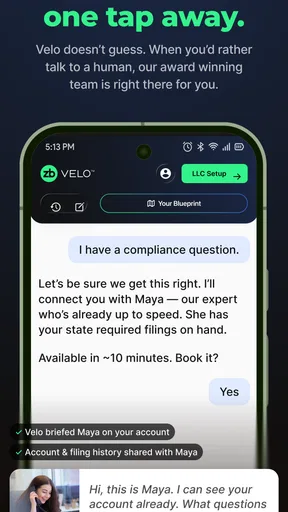

 Analysis by AppCompare
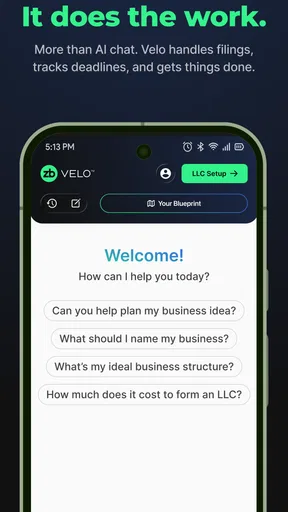
I approached ZenBusiness: LLC Formation as someone trying to turn a business idea into a properly organized company without getting buried in paperwork. The app comes from ZenBusiness and sits in the business category, with a clear focus on helping users form an LLC and receive personalized Velo® AI guidance while they build. That makes it more practical than a general productivity app, but also more specialized: its value depends heavily on whether you are at the beginning of a business journey.
My overall impression is that it works best as a guided starting point rather than a complete replacement for every professional service a growing company may need. The free price makes it easy to explore, and the Everyone content rating keeps the audience broad. At the same time, forming an LLC is an important legal and financial decision, so I would use the app to organize the process and understand the choices, not as my only source of judgment for unusual or complicated situations.
What the app is really useful for when speed matters
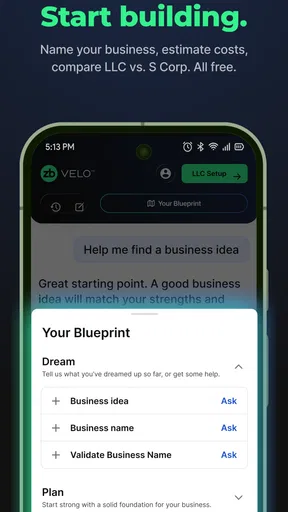
The strongest part of the experience is the way it frames LLC formation as a sequence of decisions instead of one intimidating administrative task. If I were launching a small design studio, consulting service, online shop, or freelance business, I would want to clarify the business structure, prepare the necessary details, and keep track of what still needs attention. An app built around that flow can reduce the mental load compared with searching through unrelated government pages and trying to assemble the process alone.
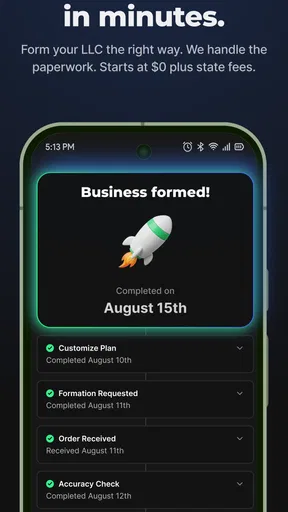
That does not mean every step becomes instant. Some parts of forming a company depend on information supplied by the user and on external filing processes, so the app cannot make every stage move at the same speed. The useful distinction is between guidance speed and official processing speed. ZenBusiness can help me decide what to do next more quickly, while the final progress of a filing may still depend on circumstances outside the app.
I also like the idea of having Velo® AI guidance available during the early planning stage. A conversational guide can be helpful when I have a basic question, such as what I should think about before choosing a structure or which business details I need close at hand. Its best role is reducing hesitation. Instead of opening several browser tabs every time I encounter an unfamiliar term, I can use the guidance as a first explanation and then investigate anything that carries serious legal consequences.
For a first-time founder, that change in pace can be meaningful. The usual alternative is to work through official websites, articles, spreadsheets, and saved notes separately. Those sources may remain necessary, but they do not always provide a smooth path from one decision to the next. This app is more approachable because the business formation task is presented as something I can work through from a mobile device.
There is an important trade-off, though. A guided workflow can feel faster than independent research, but it may also encourage me to move forward before I have properly considered details such as the nature of my business, the people involved, or the obligations that come after formation. I would treat quick progress as a convenience, not proof that every decision is suitable.
Worth Reading Before You Choose

EA SPORTS FC Mobile 26 Is a Bigger Football Game, but It Takes Time

Flipboard Shows What News Apps Must Do Beyond the Feed

Switching to Android Auto Means Rethinking Your Driving Routine

Google Calendar Makes a Crowded Week Easier to Manage

Ludo King Makes the Most of the Minutes Between Plans

Baby Panda World Brings Quick Play to Modern Phones, but Its Game Library Feels Busy
A realistic first-week workflow
Imagine I have accepted my first few clients and no longer want to operate informally. I could open the app during a lunch break, review the formation path, gather my business name and contact information, and use the Velo® guidance to identify questions I should resolve before submitting anything. Later, I could return with a clearer head rather than trying to complete the entire process in one sitting.
That pause-and-return habit is one of the more useful ways to approach this kind of tool. I would keep a separate note with decisions that require confirmation, especially anything involving taxes, ownership, registered details, or ongoing compliance. The app can serve as the central starting point, while my notes prevent a fast mobile session from turning into an impulsive filing.
Another practical tip is to prepare the information before opening the formation workflow. Having the business identity and basic ownership details ready should make the process feel less fragmented. If I start without those details, the experience may seem slow even when the app itself is responding normally, because I am repeatedly stopping to search for information.
How it handles heavier moments and repeated use
Business formation is not usually a single dramatic session. The heavier moments come when I compare options, revisit earlier answers, ask several follow-up questions, or return after a break and try to remember why I made a particular choice. That is where the app’s usefulness depends less on raw speed and more on whether its guidance keeps the process understandable.
I would expect the most demanding use to happen when the initial excitement wears off and practical questions begin stacking up. For example, I might understand that an LLC is the direction I want to explore, but still need to think carefully about the business name, the people connected to it, and what I will need to manage afterward. A focused business app is more helpful here than a generic notes app because the questions are tied to a specific formation objective.
However, I would not rely on an AI guide to settle every complicated edge case. Velo® can be useful for turning a vague concern into a clearer question, but personalized guidance is not the same thing as individualized legal or tax advice. If my business has multiple owners, unusual arrangements, regulated activities, or cross-border considerations, I would compare the app’s guidance with an appropriately qualified professional before committing.
This is also where the app differs from hiring a lawyer or accountant. A professional can ask questions I may not think to ask and can examine the situation as a whole. ZenBusiness is more convenient for orientation and routine preparation, especially when the alternative is doing nothing because professional help feels too expensive or premature. I see it as a bridge between confusion and a more informed decision, not as a universal substitute.
Repeated use should also be approached deliberately. I would avoid asking the same broad question several different ways and then treating the most convenient answer as the correct one. A better workflow is to ask one focused question, record the answer in plain language, identify what still needs verification, and then continue. That makes the AI feature a reasoning aid rather than a source of endless reassurance.
Where the free model helps and where expectations need care
The app is free to install, which lowers the barrier for someone who is only exploring whether formalizing a business makes sense. That is valuable because many new founders are not ready to commit money before they understand the process. I could use the app to get organized and decide whether the formation route fits my situation before spending time on more advanced help.
Still, free access should not be confused with a promise that every possible business need is covered at no cost. Formation, filing-related services, and continuing obligations can involve separate decisions and expenses in the real world. I would read each screen carefully and distinguish between general guidance, an optional service, and an action that creates an official responsibility.
One useful habit is to stop at every point where the app asks me to confirm a meaningful detail. On a phone, it is easy to tap through a form while distracted. I would review names, addresses, ownership information, and any summary before moving on. That small pause is more important than shaving a few minutes off the process.
Stability and recovery when I return to the process
For an app connected to an important administrative task, reliability matters more to me than visual excitement. I want the workflow to feel predictable, the wording to remain clear, and my place in the process to be understandable when I return later. ZenBusiness has a focused purpose, which should make it easier to judge whether each screen is helping me move forward.
My main concern with any mobile formation workflow is not just whether it opens quickly. It is whether I can recover calmly after an interruption. A phone call, a low battery, or a decision that needs more research should not make me feel forced to rush. I would therefore treat the app as one part of the process and keep a simple external record of completed decisions and outstanding questions.
That recovery method is especially useful if I am working in short sessions. Instead of assuming I will remember everything, I would note the last completed step and the exact issue that stopped me. This turns a fragmented mobile experience into a manageable project. It also protects me from repeating an answer simply because I cannot remember what I entered earlier.
The app’s presence on the market suggests that it has attracted a substantial audience, with over one hundred thousand installs. Its average rating is around 3.6, based on over eight hundred ratings, which gives me a balanced impression rather than an automatic endorsement. I read that combination as a sign that the app is useful for many people but may not feel equally smooth or complete for everyone.
The rating also reinforces my advice to approach it as a tool that needs active checking. A business app can be valuable even when users have different expectations about support, filing, guidance, or workflow clarity. Someone looking for a simple path may appreciate its structure, while someone expecting a full professional relationship may find the boundaries frustrating.
What I would do if something feels unclear
If an answer or instruction seems ambiguous, I would not keep tapping until the issue disappears. I would first ask the Velo® guide a narrower question, then compare the explanation with official information or professional advice when the decision has legal or financial weight. This two-step approach is one of the safest ways to use the app’s convenience without giving it more authority than it should have.
I would also take screenshots or notes of important summaries for my own records, provided no sensitive information is exposed on a shared device. That is not because the app is necessarily unreliable; it is simply good practice when a process involves business identity and formal submissions. Recovery is easier when I have a personal trail of what I intended to do.
Another non-obvious limitation is the risk of mistaking personalization for context. A guide may tailor its wording to my question, but it cannot automatically know every fact about my business unless I provide it and the workflow supports it. I would state the relevant context clearly, avoid vague prompts, and treat a concise response as a starting point rather than a final ruling.
Device limits, operating system needs, and everyday practicality
The current version is 2026.14 and requires iOS or Android 11 or newer. That requirement is reasonable for people using a relatively modern phone, but it matters if I keep an older device for business administration. Before planning the entire formation process around the app, I would check that my phone meets the operating-system requirement and that I can use it comfortably for reading detailed instructions.
A larger screen can make a noticeable difference even when the app works on a phone. Reviewing names, addresses, ownership information, and confirmation pages is easier when I do not have to scroll constantly. I would use a tablet or a computer browser for careful review if that option is available to me, while keeping the mobile app for quick questions and progress checks.
Resource demands are difficult to judge from the app’s business purpose alone, and I would not assume that a focused app is automatically light on every device. In practical terms, the heavier burden is likely to be attention rather than processing power: reading carefully, checking entries, and understanding what each decision means. A powerful phone cannot compensate for completing a legal form while distracted.
Privacy is another reason to choose the device thoughtfully. Business formation can involve personal and company details, so I would avoid completing sensitive steps on a public device or an unsecured connection. I would also make sure I know who else can access the phone. These precautions are part of using a business formation app responsibly, regardless of how polished the interface feels.
The Everyone rating makes the app broadly approachable, but age suitability does not mean every user is equally prepared for the subject matter. A younger user may be able to open and understand the interface while still needing an adult or professional to explain the legal and financial consequences of forming a company. The rating describes accessibility, not business readiness.
Who benefits most, and who should choose another route
I would recommend trying it if I were a solo founder, freelancer, small online seller, or early-stage service provider who wants a structured introduction to LLC formation. It is particularly appealing when I need a clear starting point, prefer mobile guidance, and want to turn scattered research into a sequence of manageable tasks.
I would be more cautious if I were forming a company with complicated ownership, operating across several jurisdictions, handling regulated work, or making decisions with significant tax consequences. In those cases, the better option may be a lawyer, accountant, or a combination of official resources and professional advice. The app can still help me prepare questions, but I would not make it the final authority.
I would also skip it if I am already comfortable navigating official filing systems and have a well-established professional team. For that user, the app may add another layer instead of saving time. Its strongest benefit is reducing uncertainty for people who are not yet sure how to begin, not replacing a mature administrative process.
My performance verdict after weighing convenience against caution
ZenBusiness: LLC Formation is a sensible entry point for people who want to organize the early stages of creating an LLC from a mobile device. I appreciate the combination of a free starting point, a focused business workflow, and Velo® AI guidance that can help translate uncertainty into practical questions. The app feels most valuable when I use it in short, deliberate sessions rather than rushing through every screen.
Its perceived speed is good for orientation and preparation, but official outcomes should not be judged by how quickly the app responds. During heavier use, the real challenge is managing decisions and context, not simply loading screens. For reliability, I would pair the app with personal notes and careful review so that interruptions do not turn into duplicated or careless entries.
The operating-system requirement means I would check device compatibility first, and I would prefer a larger screen for final reviews. The broad age rating makes it approachable, but the seriousness of LLC formation still calls for adult judgment and, in complex cases, professional input.
My final recommendation is straightforward: use it if you want a guided path into business formation and need help getting organized. Use it alongside official sources when a detail matters, and bring in a qualified professional when your situation is unusual or high-stakes. The app is at its best as a practical launchpad, not as the entire business-administration team. With that expectation, it can make the first steps feel less scattered and more achievable.
Pros
- Clear step-by-step guidance for forming an LLC
- Registered agent services help protect your personal address
- Online dashboard keeps formation documents organized
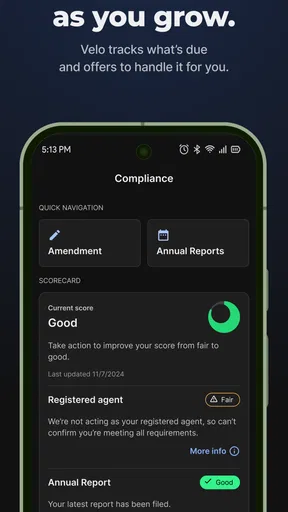
- Optional compliance reminders can reduce missed filing deadlines
- Helpful resources explain basic business setup requirements
Cons
- Many useful features require paid plans or add-on purchases
- Availability and pricing vary depending on your state
- Support response times may differ during busy periods
- The service does not replace personalized legal or tax advice
- Additional state fees are separate from ZenBusiness charges
FAQs for ZenBusiness: LLC Formation
What is ZenBusiness: LLC Formation, and what does it help with?
ZenBusiness is an online business formation service designed to help entrepreneurs create and manage a limited liability company. Through the platform, users can typically explore LLC formation options, receive guidance on required information, monitor filing progress, and access ongoing compliance-related services. It is intended to simplify administrative tasks for new business owners, although availability, pricing, and filing requirements may vary by state.
Can I form an LLC directly from the ZenBusiness app?
The app is primarily designed to guide users through ZenBusiness services and provide access to their account, documents, updates, and business management tools. Depending on your location and the current version of the app, some formation steps may be completed through the mobile experience, while other steps may redirect you to the ZenBusiness website or require additional information. Always review the final filing details before submitting.
How much does ZenBusiness LLC formation cost?
The total cost depends on the formation package you choose, your state’s filing fee, and any optional services added during checkout. State fees are generally separate from ZenBusiness service charges, and extras such as registered agent services, compliance assistance, or business-related add-ons may affect the final price. Check the complete order summary carefully, including renewal terms, before confirming payment.
Does ZenBusiness provide legal or tax advice?
ZenBusiness can provide business formation guidance, organizational tools, and access to certain professional services, but it should not automatically be treated as a substitute for a licensed attorney or certified tax professional. LLC rules, tax obligations, licenses, and reporting requirements differ by state and business type. For complicated ownership, liability, or tax questions, consulting a qualified professional is recommended.
Is ZenBusiness useful after my LLC has been created?
Yes, ZenBusiness is designed to support business owners beyond the initial filing. Depending on the plan and services selected, the platform may help users organize company documents, track compliance deadlines, manage registered agent services, and access additional business resources. However, some features may require a paid subscription or renewal, so review cancellation policies, recurring charges, and included benefits before subscribing.


